العودة للمدونة
Computer Vision Models for Industry · Part 6 of 6Computer Vision
From Prototype to Production: The Complete Guide to Deploying Computer Vision Models at Scale
Building a computer vision model that performs well in a Jupyter notebook is only half the battle. The journey from prototype to production involves navigating licensing complexities, optimizing for target hardware, integrating video tracking capabilities, managing cloud costs, and designing scalable architectures. This final installment provides the comprehensive playbook for making that transition successfully.
The stakes are significant: a model achieving 55% mAP in testing can drop to 45% in production due to poor optimization choices. A deployment that seems cost-effective at 1,000 requests per day can become financially unsustainable at 1 million. And a licensing oversight made during prototyping can force complete architectural rewrites when scaling commercially.
This guide addresses each of these challenges with practical, verified guidance based on real deployment experience and current (February 2026) tooling.
Key Insight:
The gap between prototype and production isn't just technical—it spans legal, financial, and operational domains. Each decision compounds throughout the system lifetime.
Part 1: The Licensing Landscape
Why Licensing Matters More Than You Think
Licensing is often dismissed during prototyping—you just want the model that works best, right? But this oversight has derailed production deployments and forced companies to rewrite entire systems. Understanding licensing implications before you invest engineering effort saves months of rework.
The fundamental question: Do you need to keep your application code proprietary?
If you're building a commercial product, integrating detection into a mobile app, or creating a SaaS platform, the answer is almost certainly yes. This single question determines which models are viable for your use case.
License Types Explained
The open-source landscape includes several license types with dramatically different implications:
AGPL-3.0 (Affero General Public License)
The AGPL-3.0 license is designed to ensure that software freedom extends to network services. Its key provision: if you use AGPL-licensed code in a service accessible over a network, you must make your entire application's source code available to users.
For commercial software, this means:
- ●Your mobile app's source code must be open-sourced
- ●Your SaaS backend must be fully disclosed
- ●Your embedded system's firmware becomes public
- ●Custom model weights trained using the framework fall under the same license
Apache 2.0
The Apache 2.0 license is business-friendly, allowing:
- ●Commercial use without open-sourcing
- ●Private modifications and derivative works
- ●Distribution with proprietary additions
- ●No requirement to disclose source code
The only requirements are attribution and including the license text.
MIT License
Similar to Apache 2.0 in permissiveness, with even fewer requirements—just maintain copyright notice and license text.
Model-by-Model License Analysis
Understanding which models use which licenses is critical for production planning:
| Model Family | License | Commercial Without Open-Source? | Notes |
|---|---|---|---|
| YOLO (Ultralytics) | AGPL-3.0 | ❌ No* | Includes YOLOv5, v8, v9, v10, v11, YOLO26 |
| RF-DETR | Apache 2.0 | ✅ Yes | Roboflow's transformer detector |
| RT-DETR | Apache 2.0 | ✅ Yes | Baidu/PaddlePaddle implementation |
| D-FINE | Apache 2.0 | ✅ Yes | Fine-grained distribution refinement |
| DETR / Deformable DETR | Apache 2.0 | ✅ Yes | Meta Research implementations |
| Grounding DINO | Apache 2.0 | ✅ Yes | Open-vocabulary detection |
| SAM / SAM2 | Apache 2.0 | ✅ Yes | Meta's segmentation models |
| Florence-2 | MIT | ✅ Yes | Microsoft's multi-task model |
| YOLO-NAS | Custom | ⚠️ Check | Deci AI proprietary elements |
*Ultralytics Enterprise License removes the open-source requirement.
The Ultralytics Enterprise Option
For organizations committed to the YOLO ecosystem, Ultralytics offers an Enterprise License that:
- ●Removes the open-source requirement entirely
- ●Allows private deployment and distribution
- ●Provides access to Enterprise models trained on 1M-image datasets
- ●Includes custom SLA and advanced support
- ●Grants full ownership of modifications
Roboflow is also an authorized licensor of Ultralytics models, offering commercial licensing through their cloud deployment platform with transparent pricing and no sales conversation required for standard tiers.
Pricing: Enterprise licensing requires direct negotiation with Ultralytics—costs vary based on organization size and use case. Contact ultralytics.com/license for quotes.
License Decision Framework
START: Will your code be proprietary/commercial?
│
├─ NO (Open-source project) → Any model is fine, including AGPL
│
└─ YES → Do you have budget for enterprise licensing?
         │
         ├─ YES ($10K+/year) → Consider:
         │                     • Ultralytics Enterprise (best ecosystem)
         │                     • Roboflow deployment (includes licensing)
         │
         └─ NO → Use Apache 2.0 models:
                 • RF-DETR (SOTA accuracy, Feb 2026)
                 • RT-DETR (proven, stable)
                 • D-FINE (excellent localization)
                 • Grounding DINO (open-vocabulary)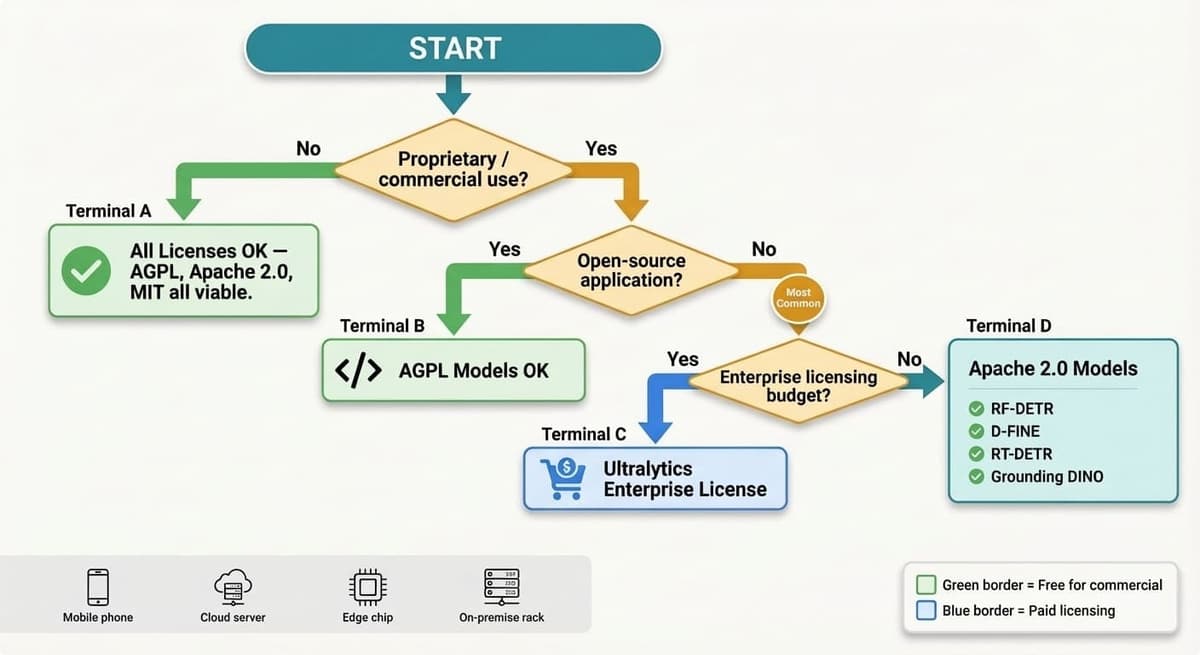
Due Diligence Checklist
Before committing to production deployment, verify:
- ●License type of model architecture code
- ●License of pre-trained weights (can differ from code)
- ●License of any training data used for fine-tuning
- ●Export format licenses (TensorRT has NVIDIA terms)
- ●Third-party dependencies in inference pipeline
- ●Cloud provider AI-specific terms of service
- ●Patent clauses in license (Apache 2.0 includes patent grant)
Part 2: Model Export and Optimization
The Optimization Stack
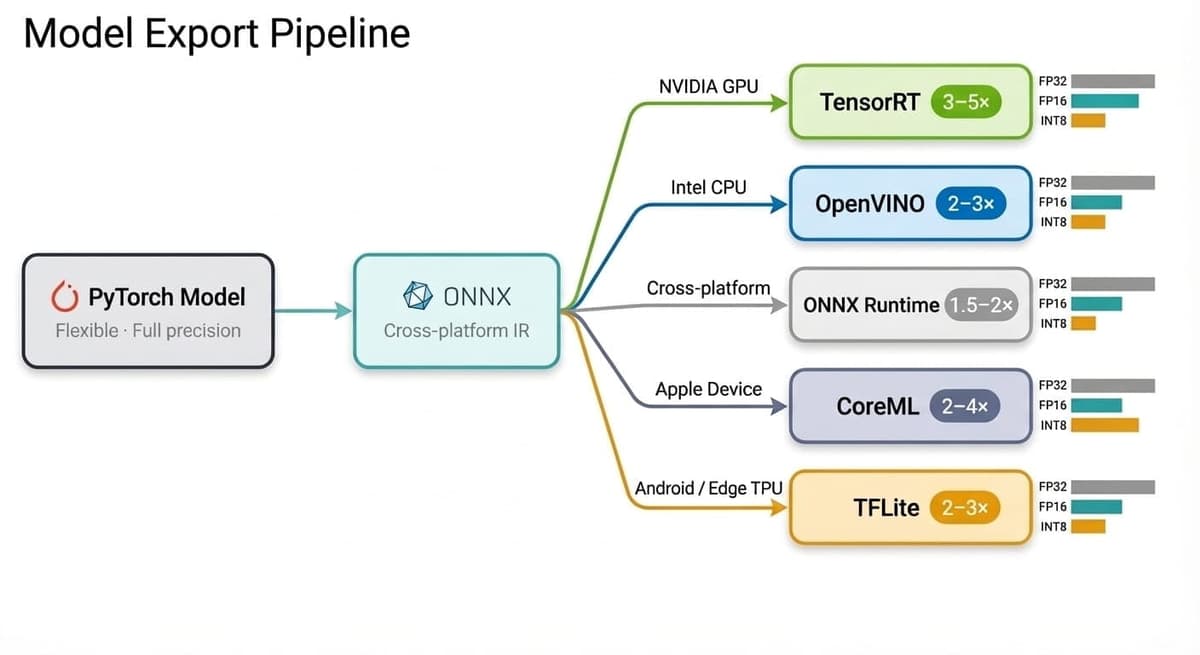
Moving from development to production requires transforming your PyTorch model through a series of optimizations. Each stage trades flexibility for performance:
PyTorch (.pt)          → Development, full flexibility
  ↓
ONNX (.onnx)           → Cross-platform intermediate
  ↓
TensorRT/OpenVINO      → Hardware-specific, maximum speed
Export Format Selection
Different deployment targets require different export formats:
| Target Platform | Recommended Format | Typical Speedup | Quantization Support |
|---|---|---|---|
| NVIDIA GPU (Cloud) | TensorRT (.engine) | 3-5× | FP16, INT8 |
| NVIDIA Jetson | TensorRT (.engine) | 3-4× | FP16, INT8 |
| Intel CPU | OpenVINO (.xml/.bin) | 2-3× | INT8 |
| Cross-platform | ONNX Runtime | 1.5-2× | INT8, FP16 |
| Apple devices | CoreML (.mlmodel) | 2-4× | FP16 |
| Android | TensorFlow Lite | 2-3× | INT8 |
| Web browser | ONNX.js / TF.js | Limited | FP32 only |
| Google Coral | Edge TPU | 3-5× | INT8 only |
TensorRT Export: The Gold Standard for NVIDIA
TensorRT provides the best inference performance on NVIDIA hardware through kernel fusion, precision calibration, and layer optimization. The 2025–2026 releases have significantly improved transformer model support, making it viable for both YOLO and DETR-family models.
Step 1: Export to ONNX (Intermediate)
from ultralytics import YOLO

# Load trained model
model = YOLO("best.pt")

# Export to ONNX with optimizations
model.export(
  format="onnx",
  imgsz=640,
  dynamic=True,      # Enable dynamic batch size
  simplify=True,     # Simplify ONNX graph
  opset=17           # Latest ONNX opset for best compatibility
)
Step 2: Convert to TensorRT
# Direct TensorRT export (recommended for Ultralytics models)
model.export(
  format="engine",
  imgsz=640,
  half=True,         # FP16 precision: 2× speedup, minimal accuracy loss
  dynamic=True,
  batch=8,           # Maximum batch size for dynamic batching
  workspace=4        # GPU memory workspace in GB
)
Step 3: INT8 Quantization (Maximum Performance)
INT8 quantization provides the highest speedup but requires calibration data:
# INT8 requires representative calibration dataset
model.export(
  format="engine",
  imgsz=640,
  int8=True,
  data="calibration.yaml",  # Dataset for calibration
  batch=8,
  workspace=4
)
Precision Trade-offs
Understanding what you sacrifice at each precision level:
| Precision | Speed vs FP32 | mAP Impact | Model Size | Memory Usage | Best For |
|---|---|---|---|---|---|
| FP32 | 1× (baseline) | None | 100% | 100% | Development only |
| FP16 | ~2× | < 0.5% | 50% | 50% | Production default |
| INT8 | ~3-4× | 1-3% | 25% | 25% | Edge, high throughput |
Key Insight:
FP16 optimization significantly improves inference speed without compromising mAP, while INT8 optimization can negatively impact recall and overall mAP, particularly on edge devices like Jetson. The theoretical 4× INT8 speedup often delivers only 2–2.5× in practice due to memory bandwidth limitations.
OpenVINO Export for Intel Hardware
For deployments on Intel CPUs without dedicated GPUs, OpenVINO provides substantial acceleration through Advanced Matrix Extensions (AMX) on newer Xeon processors:
from ultralytics import YOLO

model = YOLO("best.pt")

# Export to OpenVINO IR format
model.export(
  format="openvino",
  imgsz=640,
  half=False,        # Use FP32 for CPU, FP16 for Intel iGPU
  dynamic=True
)
Intel Xeon 6 processors with AMX can now deliver GPU-class performance for YOLO inference entirely on CPU when combined with OpenVINO optimization—a significant development for organizations without GPU infrastructure.
Mobile Export Workflows
CoreML for iOS/macOS:
model.export(
  format="coreml",
  imgsz=640,
  half=True,         # FP16 for Neural Engine
  nms=True           # Include NMS in exported model
)
TensorFlow Lite for Android:
model.export(
  format="tflite",
  imgsz=640,
  int8=True,         # Quantize for mobile efficiency
  data="calibration.yaml"
)
Export Troubleshooting
| Issue | Likely Cause | Solution |
|---|---|---|
| ONNX export fails | Dynamic shape incompatibility | Set dynamic=False, use fixed input size |
| TensorRT first inference slow | Engine building at runtime | Pre-build engine, save to disk, load at startup |
| INT8 accuracy drop > 3% | Poor calibration dataset | Use representative data, more calibration images |
| CoreML missing NMS | Export configuration | Add nms=True parameter |
| OpenVINO shape errors | Dynamic axes mismatch | Use fixed batch size |
| TensorRT out of memory | Workspace too large | Reduce workspace parameter |
Part 3: Video Object Tracking Integration
Beyond Single-Frame Detection
Object detection answers "what" and "where" for a single frame. Object tracking adds "who"—maintaining consistent identities across video frames. This distinction is critical for real-world applications:
| Use Case | Detection Only | With Tracking |
|---|---|---|
| People counting | Counts duplicates each frame | Accurate unique individuals |
| Sports analytics | Player positions per frame | Trajectories, statistics, behavior |
| Surveillance | Alert per detection event | Track individuals across cameras |
| Traffic monitoring | Vehicle presence | Speed, direction, flow patterns |
| Retail analytics | Presence detection | Customer journey mapping |
| Manufacturing | Defect detection | Defect tracking through process |
Tracking Algorithm Landscape (2026)
The tracking ecosystem has matured significantly, with clear winners for different use cases:
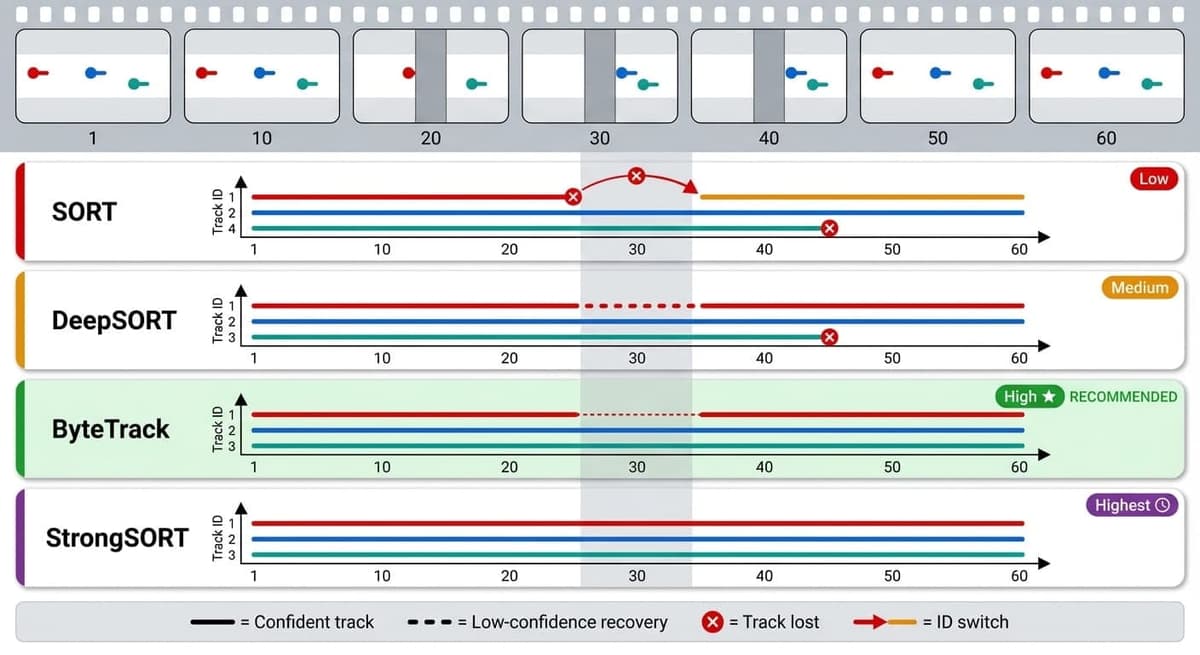
| Algorithm | MOTA | ID Switches | Speed (FPS) | Complexity | Best For |
|---|---|---|---|---|---|
| SORT | ~55% | High | 143+ | Low | Simple scenes, maximum speed |
| DeepSORT | ~61% | Medium | 28-61 | Medium | Re-identification needed |
| ByteTrack | 77-80% | Low | 30-171 | Low | General purpose (recommended) |
| OC-SORT | ~76% | Low | 150 | Medium | Moving cameras, occlusions |
| StrongSORT | ~87% | Very Low | 20-30 | High | Maximum accuracy, offline |
| BoT-SORT | ~78% | Low | 100 | Medium | Complex scenes |
Benchmarks based on MOT17/MOT20 datasets. Note: MOTA scores vary significantly based on detector quality—ByteTrack with bytetrack_x achieves 90% MOTA on MOT17, while smaller variants achieve 77–80%. FPS depends on detection + tracking combined; tracking-only speeds are much higher.
ByteTrack: The Recommended Default
ByteTrack (ECCV 2022) has become the de facto standard for production tracking due to its excellent balance of accuracy and speed. Its key innovation: using all detection boxes, not just high-confidence ones.
How ByteTrack Works:
- 1First pass: Match high-confidence detections (score > 0.5) to existing tracks using IoU
- 2Second pass: Match remaining unassigned tracks with low-confidence detections (0.1 < score < 0.5)
- 3Track management: Create new tracks, delete stale tracks based on confidence thresholds
This two-pass approach recovers objects that produce low-confidence detections during occlusion—a common failure mode for traditional trackers.
ByteTrack Integration with Ultralytics:
from ultralytics import YOLO

model = YOLO("yolo26n.pt")

# Track with ByteTrack
results = model.track(
  source="video.mp4",
  tracker="bytetrack.yaml",
  persist=True,      # Maintain track IDs across frames
  conf=0.3,          # Detection confidence threshold
  iou=0.5            # IoU threshold for track matching
)

# Process results
for result in results:
  boxes = result.boxes.xywh.cpu()
  track_ids = result.boxes.id.int().cpu().tolist()
  classes = result.boxes.cls.cpu().tolist()

  for box, track_id, cls in zip(boxes, track_ids, classes):
      print(f"Track {track_id}: Class {cls} at {box}")
Custom ByteTrack Configuration (bytetrack.yaml):
tracker_type: bytetrack
track_high_thresh: 0.5      # Confidence for first-pass matching
track_low_thresh: 0.1       # Minimum confidence to consider
new_track_thresh: 0.6       # Confidence to create new track
track_buffer: 30            # Frames to keep lost tracks
match_thresh: 0.8           # IoU threshold for matching
OC-SORT for Challenging Scenarios
For drone footage, moving cameras, or scenes with significant occlusion, OC-SORT (Observation-Centric Re-Update, CVPR 2023) provides better performance through a fundamentally different approach to handling lost tracks. Standard Kalman-filter-based trackers like SORT and ByteTrack predict object positions during occlusion using constant-velocity assumptions—but when the camera itself is moving, or objects change direction while occluded, these predictions accumulate error rapidly. OC-SORT addresses this by re-updating the Kalman filter state with the last reliable observation when a track is recovered, effectively erasing the accumulated prediction error. It also incorporates observation-centric momentum to handle non-linear motion better.
In practice, OC-SORT excels in three scenarios where ByteTrack shows weakness:
- 1Drone-mounted or vehicle-mounted cameras where ego-motion confounds the Kalman prediction model
- 2Sports analytics where players frequently change speed and direction behind other players
- 3Crowded scenes where objects remain occluded for extended periods (30+ frames)
For stationary-camera surveillance and traffic monitoring, ByteTrack remains the better default due to its simpler implementation and faster processing.
# OC-SORT integration
results = model.track(
  source="drone_footage.mp4",
  tracker="ocsort.yaml",
  persist=True
)
Multi-Camera Tracking Architecture
Real-world deployments often require tracking across multiple cameras:
Camera 1 ──→ YOLO + ByteTrack ──→ Local Tracks ──┐
Camera 2 ──→ YOLO + ByteTrack ──→ Local Tracks ──┼──→ Re-ID ──→ Global IDs
Camera 3 ──→ YOLO + ByteTrack ──→ Local Tracks ──┘     Matching
Key Challenges:
- ●Appearance changes between cameras (different lighting, angles)
- ●No spatial overlap (can't use continuity)
- ●Time gaps (person may be off-camera for minutes)
Practical Solutions:
- 1Train Re-ID model on your specific environment
- 2Combine appearance features with spatio-temporal cues
- 3Use graph neural networks for cross-camera association
- 4Implement zone-based handoff for adjacent camera coverage
Tracking Metrics Explained
| Metric | What It Measures | Good Score | Critical For |
|---|---|---|---|
| MOTA | Overall accuracy (FP, FN, ID switches combined) | > 70% | General evaluation |
| MOTP | Localization precision of matched tracks | > 80% | Precision applications |
| IDF1 | Identity preservation over time | > 70% | Long-term tracking |
| ID Switches | Number of identity changes | < 500 | Counting, analytics |
| MT | Mostly Tracked (> 80% of ground truth tracked) | > 50% | Coverage |
| ML | Mostly Lost (< 20% of ground truth tracked) | < 20% | Failure detection |
Part 4: Cloud GPU Cost Analysis
The Cost Landscape in 2026
Cloud GPU pricing has evolved significantly, with specialized providers offering dramatically lower costs than traditional hyperscalers.
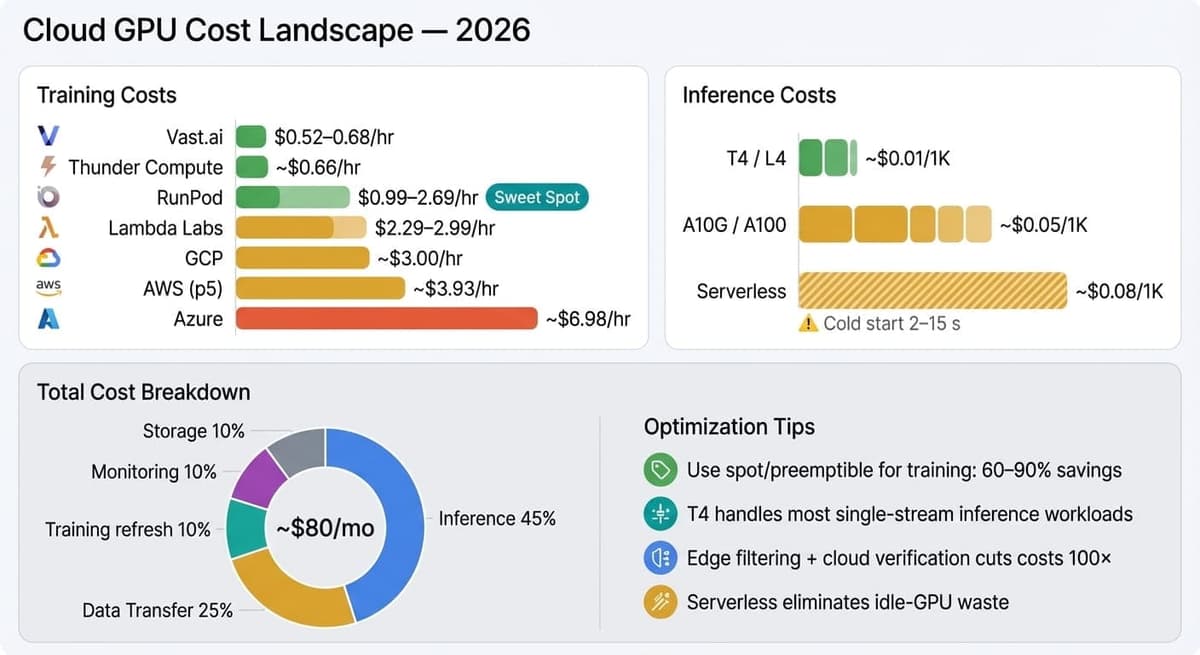
Training Cost Comparison (A100 80GB equivalent, Feb 2026):
| Provider | Hourly Cost | 100-Hour Training | Notes |
|---|---|---|---|
| Vast.ai | $0.52-0.68 | $52-68 | Marketplace model, variable availability |
| RunPod | $0.99-2.69 | $99-269 | Per-second billing, community/secure tiers |
| Lambda Labs | $2.29-2.99 | $229-299 | Transparent pricing, H100 on-demand |
| CoreWeave | $1.50-2.00 | $150-200 | Kubernetes-native, enterprise features |
| Thunder Compute | ~$0.66 | ~$66 | Budget-focused, limited regions |
| GCP | ~$3.00 | $300 | Sustained-use discounts available |
| Azure | ~$6.98 | $698 | NC H100 v5 family, enterprise integration |
| AWS (p5) | ~$3.93 | $393 | Post-June 2025 price cuts, p5.48xlarge |
Key Insight:
Specialized GPU cloud providers (Vast.ai, RunPod) now offer A100s at $0.50–2.70/hr—often 70–90% cheaper than hyperscaler on-demand rates. However, AWS and GCP have significantly reduced prices in 2025–2026, narrowing the gap. Choose based on your needs: hyperscalers for enterprise SLAs and integrations; specialized providers for cost optimization and flexibility.
Inference Cost Modeling
For production inference, cost depends on throughput requirements and hardware efficiency:
Scenario: Real-time video analytics, 1000 requests/hour
| GPU | Hourly Cost | Requests/Hour (YOLO26m) | Cost per 1K Requests |
|---|---|---|---|
| T4 | $0.30-0.50 | ~36,000 | $0.01 |
| L4 | $0.75 | ~72,000 | $0.01 |
| A10G | $0.75-1.21 | ~60,000 | $0.01-0.02 |
| A100 | $0.95-3.00 | ~120,000 | $0.01-0.03 |
Recommendation: For inference, T4 and L4 GPUs provide the best cost-efficiency. Reserve A100s for training or batch processing where throughput matters more than cost-per-request.
Cost Optimization Strategies
Strategy 1: Spot/Preemptible Instances for Training
On-Demand A100: $3.00/hour × 100 hours = $300
Spot A100:      $0.90/hour × 110 hours = $99
─────────────────────────────────────────────
Savings: 67% ($201)
Implementation requirements:
- ●Checkpoint every 30 minutes
- ●Use frameworks with automatic resume (Ultralytics, PyTorch Lightning)
- ●Set maximum bid at 40-50% of on-demand price
- ●Accept 10-15% longer total training time due to interruptions
Strategy 2: Right-Size Your GPU
| Task | Optimal GPU | Overkill GPU | Why |
|---|---|---|---|
| Inference (batch=1) | T4, L4 | A100 | Memory bandwidth, not compute, limits |
| Inference (batch=32) | A10G, L4 | H100 | Batching improves efficiency |
| Fine-tuning (< 50K images) | T4, A10G | A100 | Dataset size limits benefit |
| Training from scratch | A100 | H100 | Unless multi-GPU required |
Strategy 3: Serverless for Variable Workloads
For applications with spiky traffic, serverless inference eliminates idle costs:
| Provider | Cold Start | Billing Model | Best For |
|---|---|---|---|
| RunPod Serverless | ~5s | Per-second | Spiky production traffic |
| Modal | ~2s | Per-second | ML workloads, fast iteration |
| Replicate | ~3s | Per-prediction | Prototyping, demos |
| AWS Lambda + Inferentia | ~10s | Per-request | Low volume, AWS ecosystem |
Strategy 4: Hybrid Architecture
Combine edge filtering with cloud verification:
Edge Device (YOLO26n)          Cloud (YOLO26x)
────────────────────           ─────────────────
Process 100% of frames   →→→   Verify 1% (flagged only)
Cost: ~$0.10/day              Cost: ~$0.05/day
This architecture reduces cloud costs by 100× while maintaining accuracy for critical detections.
Total Cost of Ownership Calculator
Scenario: Production CV system, 1M images/month
TRAINING (one-time + monthly updates):
Initial training: 100 GPU-hours × $1.50 = $150 (one-time)
Monthly fine-tuning: 10 GPU-hours × $1.50 = $15/month

INFERENCE:
1M images ÷ 36,000/hour = 28 GPU-hours
28 hours × $0.35 (T4) = $10/month

STORAGE:
Models (500MB) + monthly data (10GB) = $0.30/month

DATA TRANSFER:
1M images × 500KB average × $0.09/GB = $45/month

MONITORING & LOGGING:
CloudWatch/equivalent = $10/month
─────────────────────────────────────────────────────
MONTHLY TOTAL: ~$80 + $150 initial setup
Part 5: Edge Deployment Strategies
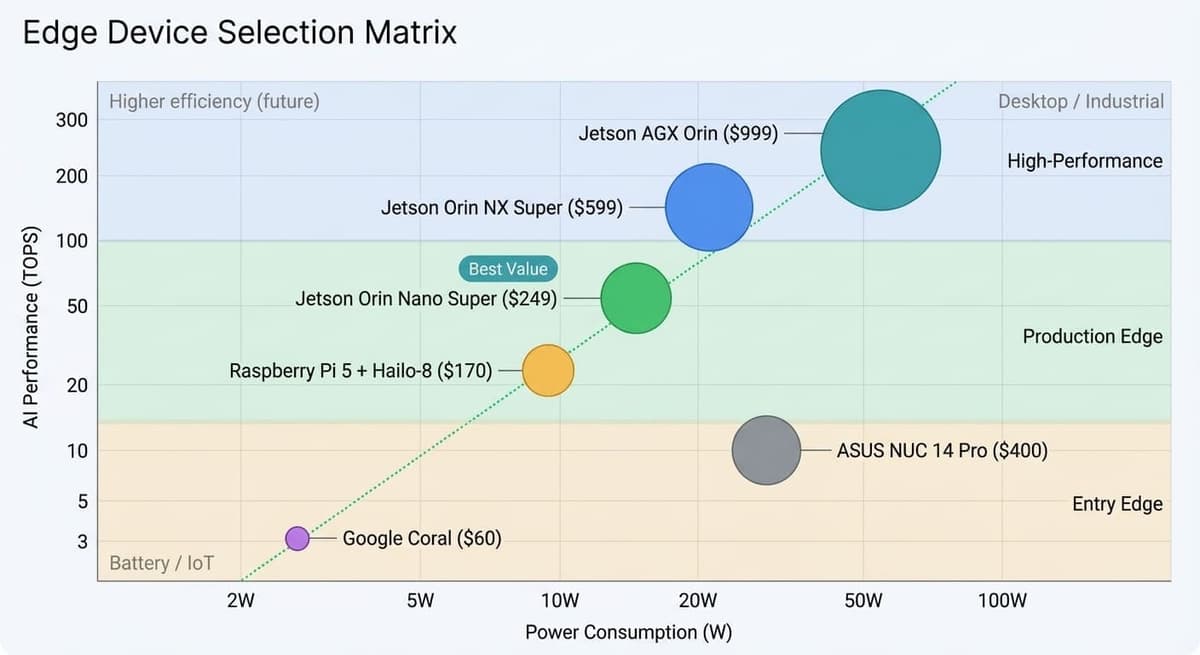
Edge Device Landscape (2026)
The edge AI ecosystem has matured significantly, with clear winners for different deployment scenarios:
| Device | Compute | Power | Price | Best Model | Use Case |
|---|---|---|---|---|---|
| Jetson AGX Orin | 275 TOPS | 15-60W | ~$999 | YOLO26m, RF-DETR-B | High-performance edge |
| Jetson Orin NX Super | 100-157 TOPS | 10-25W | ~$399 | YOLO26s, RF-DETR-S | Robotics, drones |
| Jetson Orin Nano Super | 67 TOPS | 7-25W | ~$249 | YOLO26n | Cost-effective edge |
| Raspberry Pi 5 + Hailo-8 | 26 TOPS | ~8W | ~$150 | YOLO26n | Budget AI projects |
| Google Coral | 4 TOPS | 2W | ~$60 | MobileNet-SSD | Ultra-low power |
| Intel NUC (iGPU) | 10 TOPS | 28W | ~$400 | OpenVINO models | Intel ecosystem |
Note: Jetson "Super" variants achieve higher TOPS through a software update (JetPack 6.1.1+) that increases GPU, memory, and CPU clocks. The Orin Nano Super offers 67 TOPS vs. 40 TOPS on the original Nano at the same $249 price point. Orin NX Super reaches 157 TOPS (16GB variant) vs. 100 TOPS base.
YOLO26 Edge Performance
YOLO26's NMS-free architecture and removal of Distribution Focal Loss (DFL) make it particularly well-suited for edge deployment:
| Model | Jetson Orin Nano Super | Jetson Orin NX Super | Jetson AGX Orin |
|---|---|---|---|
| YOLO26n | ~50-60 FPS | ~100-120 FPS | ~200 FPS |
| YOLO26s | ~30-35 FPS | ~65-75 FPS | ~120 FPS |
| YOLO26m | ~15-18 FPS | ~35-45 FPS | ~70 FPS |
TensorRT FP16, 640×640 input resolution, Super mode enabled
Edge Optimization Techniques
1. Resolution Scaling
The fastest optimization—reduce input resolution:
| Resolution | Speed Impact | mAP Impact | Best For |
|---|---|---|---|
| 640×640 | Baseline | Baseline | General detection |
| 480×480 | +80% faster | -2% mAP | Real-time priority |
| 320×320 | +200% faster | -5% mAP | Extreme edge |
2. Model Pruning
Remove unnecessary weights for smaller, faster models:
import torch.nn.utils.prune as prune

# Structured pruning: remove 30% of weights
for name, module in model.named_modules():
  if isinstance(module, torch.nn.Conv2d):
      prune.l1_unstructured(module, name='weight', amount=0.3)
3. Knowledge Distillation
Train a smaller model to mimic a larger one:
Teacher: YOLO26x (57.5% mAP)
Student: YOLO26n (40.9% mAP → ~43% mAP with distillation)
Result: +2% mAP improvement with no speed penalty
4. Adaptive Inference
Skip processing when the scene is static:
def adaptive_inference(frame, prev_frame, model, threshold=0.02):
  # Calculate frame difference
  diff = np.mean(np.abs(frame - prev_frame))

  if diff < threshold:
      return previous_detections  # Reuse cached results
  else:
      return model(frame)  # Run full inference
This can reduce effective inference load by 60–80% for surveillance applications.
Thermal Management
Edge devices throttle performance under sustained load:
| Device | Throttle Temp | Performance Impact | Mitigation |
|---|---|---|---|
| Jetson Orin Nano | 70°C | -20% | Active cooling, heat sink |
| Raspberry Pi 5 | 80°C | -30% | Fan hat required |
| Mobile phones | 40°C surface | -40% | Burst processing only |
Practical Guidelines:
- ●Always use active cooling for continuous inference
- ●Monitor temperature and implement throttling before thermal limits
- ●Design for 80% of peak theoretical performance in production
Battery Life Considerations
For mobile and IoT deployments:
| Model | Framework | Battery Life (3000mAh, continuous) |
|---|---|---|
| MobileNetV3-Large | TFLite | ~7 hours |
| EfficientDet-Lite0 | TFLite | ~9 hours |
| YOLO26n | TFLite INT8 | ~5 hours |
| YOLO26n | CoreML | ~6 hours |
Battery Optimization:
- ●INT8 quantization reduces power by 30-40%
- ●Adaptive inference (skip static frames) extends life 2-3×
- ●Hardware accelerators (NPU, Neural Engine) significantly more efficient than GPU
Part 6: Production Architecture Patterns
Pattern 1: Serverless Inference API
Best for variable traffic, cost-sensitive deployments, < 1M requests/day.
┌─────────────────────────────────────────────────────────┐
│                  Client Applications                     │
│            (Mobile, Web, IoT Devices)                   │
└─────────────────────┬───────────────────────────────────┘
                    │ HTTPS
                    ▼
┌─────────────────────────────────────────────────────────┐
│                   API Gateway                            │
│         (Rate Limiting, Auth, Request Routing)          │
└─────────────────────┬───────────────────────────────────┘
                    │
                    ▼
┌─────────────────────────────────────────────────────────┐
│              Serverless Inference                        │
│         (RunPod Serverless / Modal / Lambda)            │
│              Auto-scaling, Per-request billing          │
└─────────────────────┬───────────────────────────────────┘
                    │
                    ▼
┌─────────────────────────────────────────────────────────┐
│                   GPU Pool                               │
│            (Warm instances, TensorRT models)            │
└─────────────────────────────────────────────────────────┘
Implementation Notes:
- ●Use warm instances to minimize cold start (5s → <1s)
- ●Implement request queuing for burst traffic
- ●Cache results for identical inputs
- ●Monitor P95 latency, not just average
Pattern 2: Real-Time Streaming Pipeline
Best for surveillance, sports analytics, autonomous systems.
┌──────────┐    ┌──────────┐    ┌──────────┐    ┌──────────┐
│  Camera  │───▶│  Decode  │───▶│  Detect  │───▶│  Track   │
│  Stream  │    │ (NVDEC)  │    │(TensorRT)│    │(ByteTrack)│
└──────────┘    └──────────┘    └──────────┘    └────┬─────┘
                                                    │
                        ┌───────────────────────────┘
                        │
                        ▼
                 ┌──────────┐    ┌──────────┐
                 │  Event   │───▶│  Output  │
                 │ Process  │    │(Alert/DB)│
                 └──────────┘    └──────────┘
Key Optimizations:
- ●Use hardware video decode (NVDEC on NVIDIA, VA-API on Intel)
- ●Process at native camera resolution, resize only for inference
- ●Implement frame skipping under load (maintain real-time)
- ●Buffer events, batch database writes
Pattern 3: Hybrid Edge-Cloud Architecture
Best for bandwidth-constrained, latency-sensitive, cost-optimized deployments.
┌────────────────────────────────────────────────────────┐
│                    EDGE TIER                            │
│  ┌────────────┐    ┌────────────┐    ┌────────────┐   │
│  │  Camera 1  │    │  Camera 2  │    │  Camera 3  │   │
│  └─────┬──────┘    └─────┬──────┘    └─────┬──────┘   │
│        │                 │                 │           │
│        ▼                 ▼                 ▼           │
│  ┌─────────────────────────────────────────────────┐  │
│  │              YOLO26n (Edge Filter)               │  │
│  │        High-speed detection, local decision      │  │
│  └─────────────────────┬───────────────────────────┘  │
│                        │ Flagged events only (1%)     │
└────────────────────────┼──────────────────────────────┘
                       │
                       ▼ (Internet)
┌────────────────────────────────────────────────────────┐
│                    CLOUD TIER                           │
│  ┌─────────────────────────────────────────────────┐  │
│  │              YOLO26x (Cloud Verify)              │  │
│  │        High-accuracy verification, logging       │  │
│  └─────────────────────┬───────────────────────────┘  │
│                        │                               │
│                        ▼                               │
│  ┌─────────────────────────────────────────────────┐  │
│  │              Business Logic & Storage            │  │
│  └─────────────────────────────────────────────────┘  │
└────────────────────────────────────────────────────────┘
Benefits:
- ●99% of processing happens locally (no cloud cost)
- ●Low-latency response for local decisions
- ●High-accuracy verification for important events
- ●100× reduction in bandwidth vs. streaming all video
Pattern 4: Multi-Model Cascade
Best for complex detection requirements, cost optimization.
       All Frames
         │
         ▼
  ┌──────────────┐
  │  YOLO26n     │  Fast initial filter
  │  (2ms, 41%)  │
  └──────┬───────┘
         │ Positive detections only
         ▼
  ┌──────────────┐
  │  RF-DETR-M   │  Accurate refinement
  │  (4.5ms, 55%)│
  └──────┬───────┘
         │ High-confidence results
         ▼
  ┌──────────────┐
  │  Business    │  Final decision
  │  Logic       │
  └──────────────┘
Use Case: Manufacturing inspection where:
- ●95% of products are defect-free (fast rejection)
- ●5% need careful analysis (accurate detection)
- ●False negatives are expensive (use high-accuracy model)
Part 7: Monitoring and Maintenance
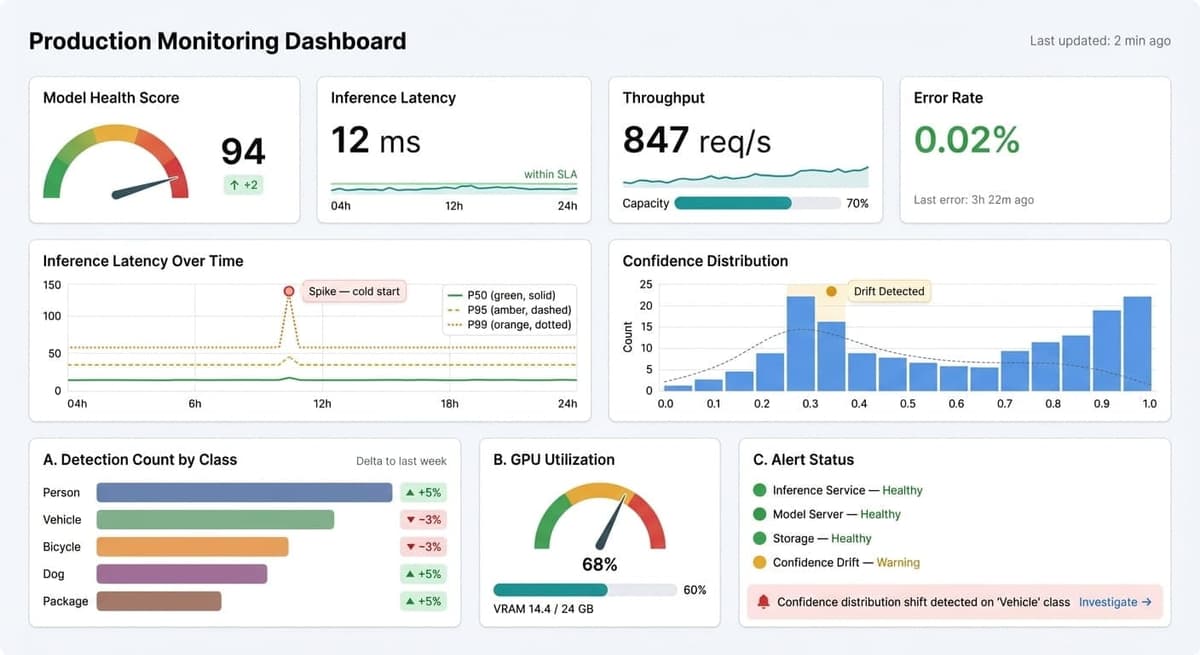
Essential Metrics
Production CV systems require monitoring beyond standard application metrics. Standard web-service observability (uptime, request rate, error count) tells you whether the service is running—but not whether the model is producing correct results. A detection system can return HTTP 200 on every request while silently missing 40% of defects because the production lighting shifted.
Accuracy Metrics: The most important and hardest to track. Detection confidence distributions are your first-line indicator of model health—plot a rolling histogram of confidence scores and compare it against the distribution observed during validation. A systematic downward shift suggests the model is encountering data it wasn't trained on. Track false positive rates per class, because a model might degrade on one class (e.g., a new product SKU in retail) while performing normally on others. For ground-truth validation, periodically sample 1–2% of production predictions and have human annotators verify them; compute mAP on this sample to get a real-world accuracy estimate rather than relying on stale validation metrics.
Performance Metrics: Median latency (P50) tells you the typical experience, but P95 and P99 tell you about tail latency—the fraction of requests that experience unacceptable delays due to GC pauses, thermal throttling, or batch queue buildup. Monitor GPU utilization and memory together: high utilization with low memory pressure is healthy; high memory with moderate utilization often indicates a memory leak in preprocessing. Queue depth and wait time are critical for streaming applications—if the queue grows faster than the model can drain it, you're dropping frames.
Operational Metrics: Model load time matters for serverless deployments where cold starts directly impact user experience. Track error rates by type (preprocessing failures, CUDA out-of-memory, timeout, invalid input) because each category demands a different response. For multi-camera deployments, upstream feed health (camera connectivity, frame corruption rate, resolution changes) is often the root cause of apparent model failures—a camera producing degraded frames looks like model degradation if you're only watching accuracy metrics.
Detecting Model Drift
Model performance degrades over time as production data diverges from training data:
def monitor_confidence_drift(predictions, window=1000):
  """Alert if confidence distribution shifts significantly."""
  recent_confs = [p.confidence for p in predictions[-window:]]
  baseline_mean = 0.72  # From training validation
  baseline_std = 0.15

  current_mean = np.mean(recent_confs)
  if abs(current_mean - baseline_mean) > 2 * baseline_std:
      alert(f"Confidence drift detected: {current_mean:.3f} vs {baseline_mean:.3f}")
Drift Indicators: Model drift is rarely sudden—it accumulates gradually as the real world diverges from training data. Seasonal changes (summer foliage vs. winter bareness in outdoor detection), equipment aging (camera lens degradation, lighting fixture burnout), and evolving object populations (new vehicle models in traffic detection, new product packaging in retail) all contribute. The most insidious form is concept drift, where the relationship between features and labels changes—a "clean" product may look different after a supplier changes materials, but the defect types remain the same. Watch for these concrete signals:
- ●Confidence scores systematically shifting higher or lower over weeks
- ●New object classes appearing frequently in low-confidence detections
- ●Detection counts per frame diverging from historical norms
- ●Inference time gradually increasing (the model allocating more attention to unfamiliar patterns)
Retraining Strategy
When to Retrain: The decision to retrain should be data-driven, not calendar-driven—though a quarterly review cadence provides useful structure. Retrain when your sampled production mAP drops more than 5% below your validation baseline, when the business requires detecting new object classes, when a significant domain shift occurs (new camera installation, production line change, different geographic deployment), or when a major new model release offers a meaningful accuracy improvement over your current architecture. Avoid the temptation to retrain reactively after every false negative; individual errors are better addressed by examining whether they represent a systematic gap or an isolated edge case.
Continuous Learning Pipeline:
Production    →  Sampling  →  Human     →  Training  →  Validation  →  Deploy
Inference        (1%)         Labeling      + Prev.       Testing        if OK
                                          Data
Best Practices:
- ●Never discard old training data when incorporating new examples—catastrophic forgetting is real
- ●Combine historical and new annotations in every training run, weighting recent examples slightly higher
- ●Before deploying an updated model, run A/B testing against the current production model on live traffic: route 5–10% of requests to the new model, compare accuracy and latency distributions, and promote only when the new model matches or exceeds on all critical metrics
- ●Maintain explicit rollback capability by keeping the previous model artifact and deployment configuration
- ●Document model lineage rigorously—record which training data, hyperparameters, and base weights produced each model version, so that any production regression can be traced to its root cause
Part 8: Final Recommendations
Quick Reference: Model Selection by Constraint
| Primary Constraint | Recommended Model | License | Why |
|---|---|---|---|
| Maximum accuracy | RF-DETR-L | Apache 2.0 | 56.5% mAP, excellent small objects |
| Maximum speed | YOLO26n | AGPL-3.0* | 1.7ms T4, NMS-free |
| Commercial (no OSS) | RF-DETR | Apache 2.0 | Best accuracy with permissive license |
| Edge deployment | YOLO26s | AGPL-3.0* | 48.6% mAP, ~25 FPS Orin Nano |
| Mobile iOS | YOLO26n CoreML | AGPL-3.0* | Neural Engine optimized |
| Mobile Android | EfficientDet-Lite | Apache 2.0 | TFLite optimized |
| Open vocabulary | Grounding DINO | Apache 2.0 | Flexible class detection |
| Video tracking | YOLO26 + ByteTrack | AGPL-3.0* | Built-in, excellent MOTA |
*Requires Enterprise License for commercial proprietary use
Budget-Based Architecture Recommendations
Startup / Small Business (< $500/month compute budget):
Model: RF-DETR-S (Apache 2.0, no license cost)
Training: Vast.ai spot instances
Inference: Self-hosted T4 or RunPod Serverless
Tracking: ByteTrack (open source)
Architecture: Serverless API pattern
Growth Stage ($500–5K/month):
Model: RF-DETR-M or YOLO26m (consider Enterprise License)
Training: Dedicated RunPod/Lambda instances
Inference: Auto-scaling GPU pool
Tracking: ByteTrack + custom Re-ID for multi-camera
Architecture: Hybrid edge-cloud pattern
Enterprise ($5K+/month):
Model: Ultralytics Enterprise + RF-DETR ensemble
Training: Reserved capacity, A100 clusters
Inference: Dedicated inference cluster with redundancy
Tracking: Custom multi-camera solution
Architecture: Multi-model cascade with A/B testing
Pre-Production Checklist
Before going live, verify:
Legal & Compliance:
- ●All model licenses verified and compliant
- ●Training data licenses documented
- ●Privacy considerations addressed (faces, personal data)
- ●Export compliance verified (some regions restrict AI)
Technical:
- ●Model exported to production format (TensorRT/OpenVINO)
- ●Quantization tested, accuracy within acceptable range
- ●Throughput benchmarked on target hardware
- ●Tracking integrated if video processing needed
- ●Error handling implemented for all failure modes
Operational:
- ●Monitoring dashboards configured
- ●Alerting rules defined (latency, accuracy, errors)
- ●Rollback procedure documented and tested
- ●On-call rotation established
- ●Cost projections validated with test traffic
Business:
- ●SLA defined and achievable
- ●Success metrics established
- ●Stakeholder sign-off obtained
- ●Documentation complete for handoff
Conclusion: The Path Forward
Deploying computer vision at scale requires navigating complexity across legal, technical, and operational domains. The key decisions—licensing, optimization format, cloud vs. edge, architecture pattern—compound throughout the system lifetime. Making informed choices at each stage, based on your specific constraints and requirements, determines whether your deployment succeeds or becomes a maintenance burden.
The 2025–2026 landscape offers unprecedented options:
- ●Licensing flexibility through Apache 2.0 models (RF-DETR, D-FINE) that rival AGPL alternatives
- ●Optimization tooling that makes TensorRT and OpenVINO accessible without deep expertise
- ●Tracking integration that adds video intelligence with minimal additional complexity
- ●Cost efficiency through specialized GPU providers and serverless architectures
- ●Edge capability through hardware like Jetson Orin and software optimizations in YOLO26
For organizations embarking on computer vision deployment, we recommend:
- 1Start with licensing—let compliance requirements narrow your model choices early
- 2Validate on production hardware—benchmark numbers from papers rarely match real-world performance
- 3Design for monitoring—visibility into model behavior is essential for long-term success
- 4Plan for evolution—the field moves fast; build systems that can adopt new models
Series Recap: The Complete Picture
This article concludes our six-part Computer Vision Models for Industry series. Together, the series provides a comprehensive framework for evaluating, selecting, and deploying computer vision in production:
- 1The YOLO Evolution — traced the architecture from v1 to YOLO26, establishing why real-time single-stage detectors remain the backbone of production CV
- 2The DETR Revolution — explored how transformers redefined object detection with end-to-end learning, global attention, and NMS-free inference
- 3Beyond Detection — surveyed open-vocabulary and foundation models that generalize beyond fixed training categories
- 4The Benchmarking Reality Check — demonstrated why published metrics rarely predict real-world performance, and how to run evaluations that do
- 5The Industry Playbook — provided a decision framework for matching models to specific business verticals and constraints
- 6From Prototype to Production — covered the full deployment pipeline from licensing through monitoring (this article)
Each installment was designed to stand alone, but the series is most powerful read as a sequence: understand the architectures, evaluate honestly, choose deliberately, and deploy carefully.
Our Perspective
At Robolabs AI, we've taken dozens of computer vision projects from Jupyter notebook to production—across factory floors, retail environments, autonomous vehicles, and edge deployments in the field. The deployment phase is where most projects succeed or fail, and it's rarely for technical reasons alone.
Here's what years of production deployment have taught us:
- ●Licensing has killed more production timelines than model accuracy ever has. We've seen teams build entire pipelines around AGPL models, only to face painful rewrites three months before launch. Settle licensing first—always.
- ●The best optimization is the one you actually benchmark on your hardware. We've watched theoretical 4× TensorRT speedups turn into 1.8× in practice because of memory bandwidth bottlenecks and thermal throttling on real edge devices.
- ●Monitoring is not optional—it's the difference between a deployed model and a production system. Every model we've deployed has drifted. The ones that stayed healthy had dashboards watching confidence distributions from day one.
- ●Edge-cloud hybrid architectures consistently deliver the best cost-performance ratio. We've reduced client cloud bills by 50–100× by moving lightweight filtering to the edge and reserving cloud GPU for verification and retraining.
- ●Plan for the model after this one. The field moves in six-month cycles. The teams that thrive are the ones who design their inference pipelines to swap models without rewriting the system around them.
The gap between prototype and production is real, but with careful planning and the right architectural choices, it's entirely bridgeable. The models, tools, and infrastructure available in 2026 make production-grade computer vision accessible to organizations of all sizes—and this series was written to help you get there.
References & Further Reading
Ultralytics. Official YOLO licensing options including Enterprise License.
GNU. Affero General Public License v3.0 — full license terms.
Apache Software Foundation. Apache License, Version 2.0.
Roboflow. Authorized commercial licensing for Ultralytics models.
NVIDIA. TensorRT Documentation — GPU inference optimization and quantization.
Ultralytics. YOLO26 TensorRT export and optimization guide.
Intel. OpenVINO toolkit for hardware-specific inference optimization.
Microsoft. ONNX Runtime — cross-platform inference optimization.
Zhang, Y., et al. (2022). ByteTrack: Multi-Object Tracking by Associating Every Detection Box. ECCV 2022.
Cao, J., et al. (2023). Observation-Centric SORT: Rethinking SORT for Robust Multi-Object Tracking. CVPR 2023.
Wojke, N., et al. (2017). Simple Online and Realtime Tracking with a Deep Association Metric. ICIP 2017.
Du, Y., et al. (2023). StrongSORT: Make DeepSORT Great Again. IEEE TMM 2023.
MOTChallenge. Multi-Object Tracking benchmark and evaluation.
RunPod. GPU cloud with per-second billing for ML workloads.
Vast.ai. GPU marketplace for cost-effective training and inference.
Lambda Labs. ML-focused cloud with transparent GPU pricing.
CoreWeave. Kubernetes-native AI cloud infrastructure.
NVIDIA. Jetson platform benchmarks and performance data.
NVIDIA. Jetson Orin Nano Super and Orin NX Super specifications.
Hailo. AI accelerators for edge deployment.
Raspberry Pi Foundation. AI HAT+ documentation for edge AI.
Google. Coral Edge TPU platform for ultra-low-power inference.
Roboflow. RF-DETR — Apache 2.0 real-time transformer detector.
Ultralytics. YOLO26 — edge-optimized real-time detection.
Peng, Y., et al. D-FINE: Fine-grained Distribution Refinement for DETRs.
Lv, W., et al. (2024). DETRs Beat YOLOs on Real-time Object Detection. CVPR 2024.
Roboflow. Open-source production inference server supporting YOLO, RF-DETR, and foundation models.
Roboflow. Python library for video analytics, annotation, and tracking integration.
MLflow. Open-source model versioning, experiment tracking, and deployment.
Prometheus / Grafana. Standard monitoring stack for production inference systems.
CVAT. Open-source data labeling platform for computer vision.
About Robolabs AI: We specialize in bridging the gap between computer vision research and production deployment. From model selection through architecture design to operational excellence, we help organizations deploy vision AI that works in the real world. Contact us at robolabs.ai for deployment consulting.
اشترك في مدونتنا
احصل على أحدث الرؤى حول الروبوتات والذكاء الاصطناعي مباشرة في بريدك الإلكتروني.
لا رسائل مزعجة. إلغاء الاشتراك في أي وقت.
You Might Also Like
View all posts
Computer Vision
The Benchmarking Reality Check: What the Numbers Really Mean for Your Computer Vision Deployment
A comprehensive technical deep-dive into object detection benchmarks, metrics, and real-world performance. Understand mAP, latency, hardware-specific results, and how to build a practical model selection framework for production deployments.
Feb 25, 202625 min read
Computer Vision
The Industry Playbook: Choosing the Right Computer Vision Model for Your Business
A comprehensive industry guide mapping computer vision models to real-world deployment scenarios across manufacturing, healthcare, retail, automotive, agriculture, and security. Practical model selection frameworks with evidence-backed recommendations.
Feb 27, 202626 min read
Computer Vision
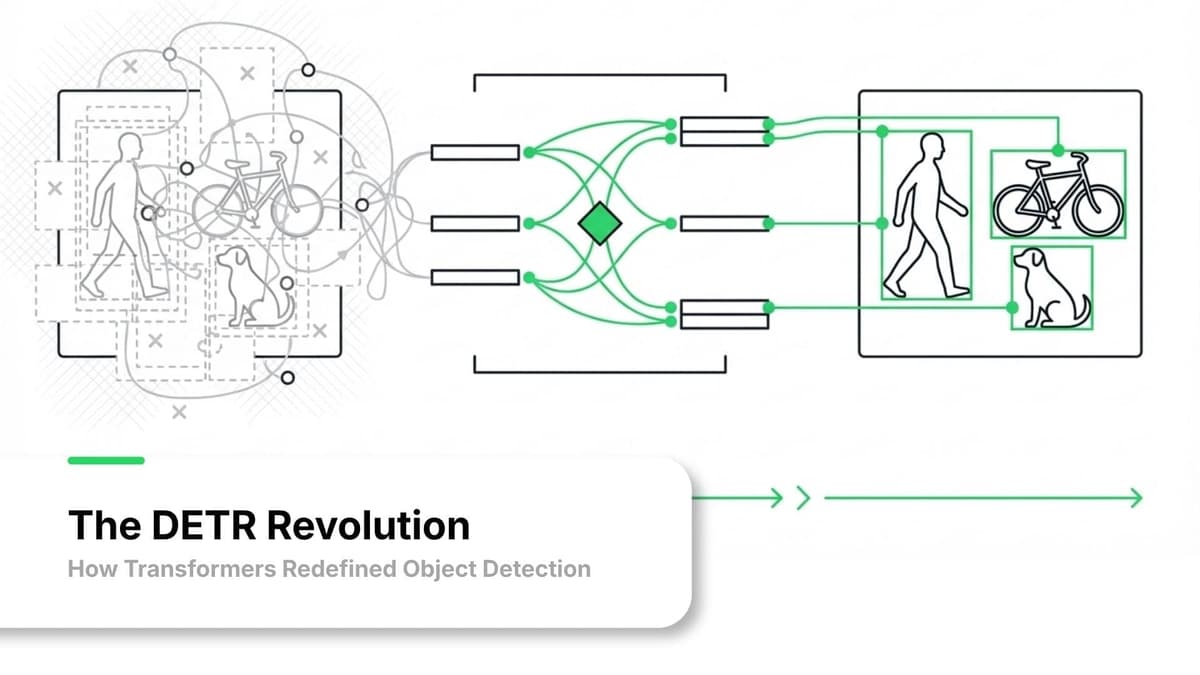
The DETR Revolution: How Transformers Redefined Object Detection
A comprehensive technical deep-dive into DETR's evolution from 2020 to 2026. Understand how transformer-based detectors work, why RF-DETR broke the 60% mAP barrier, and when to choose DETR over YOLO for your production deployments.
Feb 21, 202626 min read
هل أنت مستعد لبناء شيء مؤثر؟
دعنا نناقش كيف يمكن لفريقنا المساعدة في تحويل رؤيتك للذكاء الاصطناعي والروبوتات إلى واقع.